Git for Beginners
1 - What is Git
Git is an open-source version control system and a collaboration tool. You can view past changes to your source code, allowing you to manage versions, collaborate with your team, and work on the same project while keeping the code scalable. Let’s focus on the main key point (DVCS) distributed version control system, as we talked which makes a copy in the local system and shares it with other people who want to collaborate and merge into the main file
2- Why Git is Used
Mainly, git is used for
A) repository - This is like your school bag where many books are stored, and you write your projects or notes in it, and you store them until you need them back. If you keep them publicly in, then your friends can copy your project/work. Exactly like this git repository: you commit your code, and it's stored in your repository.
B) Commit - You are writing your project in a notebook using a pencil, and you are satisfied with it, and you want to save it forever, then what will you do? Are you going to write that section in your main notebook ? No, until you figure out this is the perfect version! Same as in git commit, it means you are good till that point you save your work, if something won’t go right or it has some issue, you come back and go back to your last checkpoint, that's why we use commit more than any other thing in git atleast save for now, if something happens, you can track or jump to the specific point of commit.
C) Branch - This is like a secret book where you do your experiment work and resolve your problem using an optimized way so you can use this work to your main notebook same in git its like a secret book you have a feature and you want to try something diffrent and you are not sure its going to work or no if its work then you merge to your main codebase or Main branch.
D) Head - This is like your school teacher who tracks which work is done or where you are, or what specific topic you are doing in your projects at the current time, so keep the reference up to date in her registers or database, so in our git, we have a head which works in a similar way its was a very basic overview.
Common Git commands
$ git init
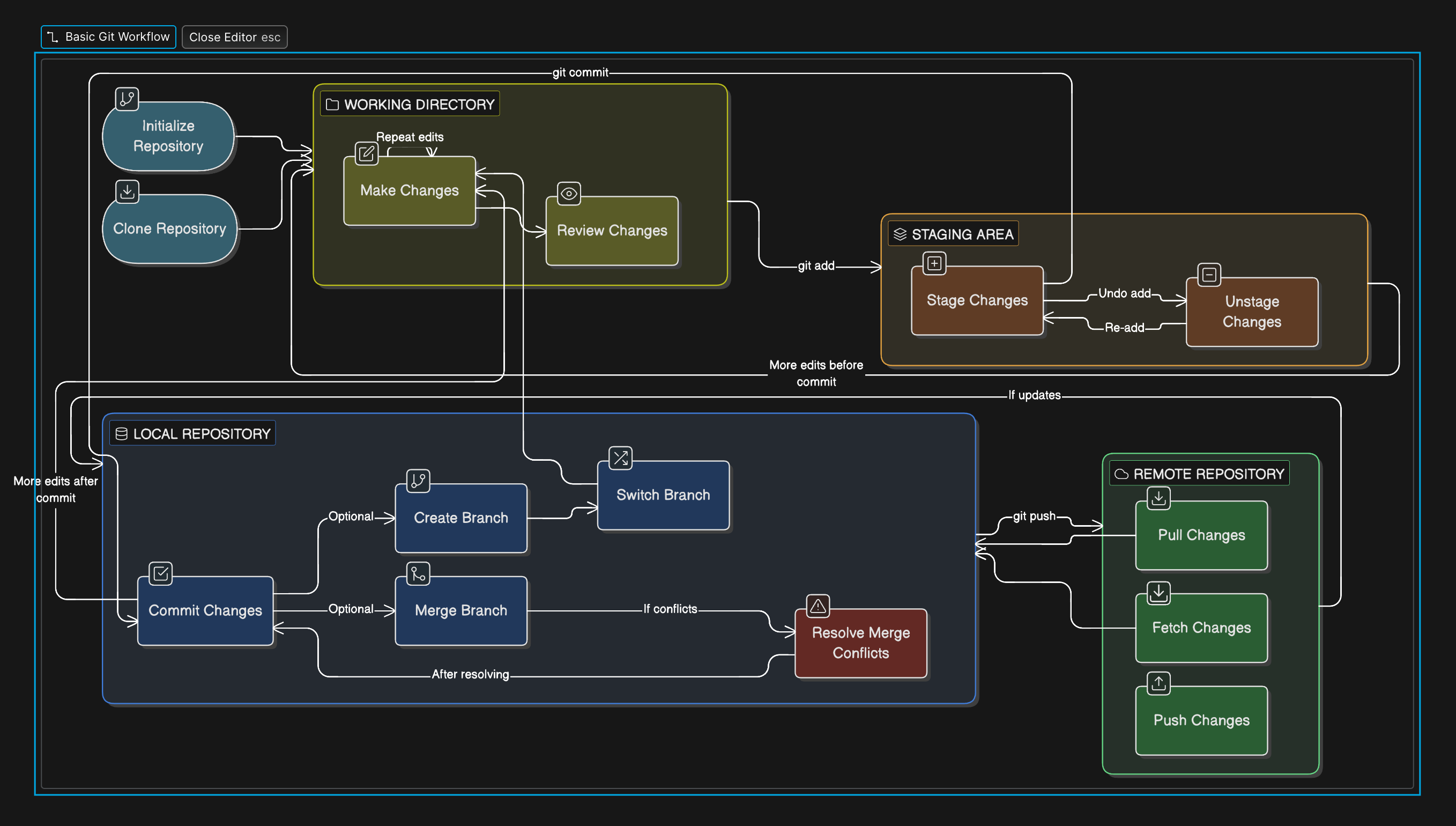
This command creates an empty git repository. Init means initialize the process, and the process begins by creating other files.
$ git status
This command shows the current status of the repository, the working repository, and the staging area/index.
$ git add
This command adds the changes to the staging area of the file you’re working on and prepares the files for the next commit.
$ git log
This command is both useful and powerful. It allows you to see the entire commit history of a repository, where you can track changes, review project progress, and see who made the changes, and help to identify when changes are made.
Workflow of Git (diagram)